Jump to the illustrated guide
When you subscribe at kefir.link, new orders and automatic payments follow your chosen interval. Each subscription requires at least two paid orders (including the first order) before you can cancel.
Go to My subscriptions
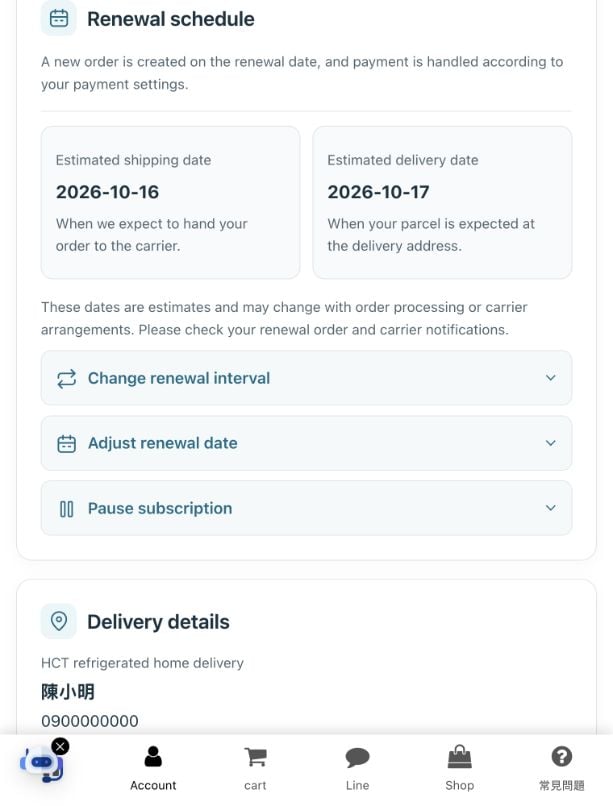
Renewal, shipping and arrival are different dates
Choose an available date at checkout for your first delivery. After that, check the next renewal date and interval under My account → My subscriptions. A new order is created on the renewal date and charged using the original card payment arrangement; billing and shipping are not fixed to Mondays.
The estimated shipping date is when we expect to hand the parcel to the carrier. The estimated delivery date is when it is expected at your address. For store pickup, we show an estimated store-arrival date. Wait for the pickup notice before going to the store.
Available dates and delivery estimates follow the checkout calendar, delivery service and holiday schedule. These are estimates; check your order and carrier notifications for actual progress. Public holidays, typhoons or government-announced closures may delay shipping and delivery.
Manage your subscription in your account
- Change the interval: choose one of the available intervals and save. This does not automatically change the next renewal date already scheduled.
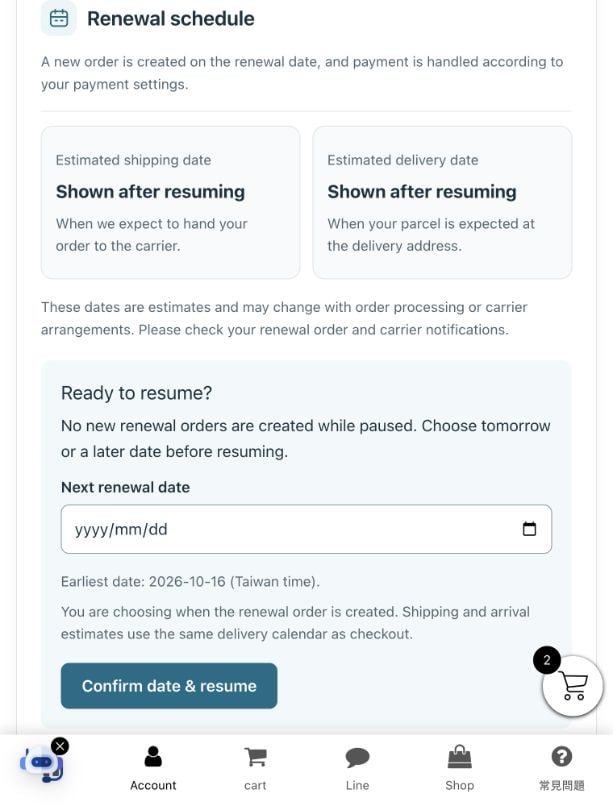
- Adjust the renewal date: bring the next renewal forward or move it later. Choose an available date from tomorrow onward, check the delivery estimates and save.
- Pause: open Pause subscription and confirm. Automatic renewals then stop. To resume, first choose a renewal date from tomorrow onward, then confirm.
- Change delivery: update the recipient, mobile number, home address or pickup store, or choose a refrigerated service allowed by checkout rules. Review the shipping charge and total per renewal before confirming.
These changes affect future renewals only. They do not change, cancel or refund orders already created. Please make changes at least two working days in advance and before the next renewal charge. If an order already exists, contact us to check whether it can still be changed. Orders that have shipped cannot be cancelled.
Some subscriptions may temporarily be unavailable for changes because of an unpaid order, payment restrictions or an imminent renewal. Follow the message shown or contact us.
Refrigerated home delivery and 7-ELEVEN pickup
Subscription products use refrigerated delivery. Available services and shipping charges are shown at checkout or when changing delivery. Standard room-temperature convenience-store delivery is not available for subscriptions.
For home delivery, enter the full address on one line, including the city or county, district, street and floor. For Black Cat refrigerated 7-ELEVEN pickup, enter the name of a store that accepts refrigerated parcels; no home address is needed. Both options require the correct recipient name and mobile number.
Payment, prices and products
Subscriptions use automatic card payments. LINE Pay, cash on delivery and bank transfer are not available. Your existing subscription keeps its product price when you change the interval or date, or pause and resume. Shipping charges may change when you change the service or destination; check the new total shown.
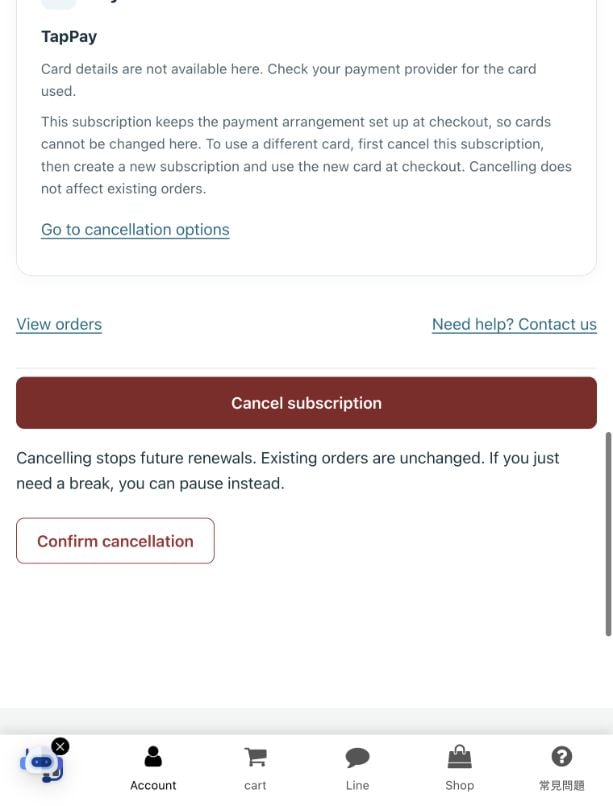
You cannot change the card on the subscription page because renewals use the payment authorisation set up at checkout. To use another card, first cancel the original subscription once it is eligible, then create a new subscription and use the new card at checkout. The new subscription uses the product prices and shipping charges available at that time.
You cannot change products or quantities, or add items for combined shipping, on the subscription page. Place a separate order for additional products. Contact us first if you need to change the subscription product or quantity. Subscriptions neither earn nor redeem member points.
Cancelling a subscription
Each subscription requires at least two paid orders (including the first order) before cancellation; early termination is not accepted. Once eligible, open the subscription, select the red Cancel subscription button, then Confirm cancellation. Complete this at least two working days before the next shipment and before the next renewal charge. Two working days are not always 48 hours; weekends and holidays must be taken into account.
If the page says the subscription is not yet eligible for online cancellation, contact us to check. Cancellation stops future renewals; existing orders are unchanged. If you only need a break, use Pause subscription. Pausing does not cancel the subscription or remove the minimum of two paid orders.
To subscribe again after cancellation, create a new subscription; there is no fixed 24-hour wait. First check that the original subscription is cancelled to avoid having two subscriptions at once. You can remove an ended subscription from your list; its order history is kept.
Orders, tracking and product issues
Select View orders on a subscription to see its related orders. My Orders shows the orders in your account. When tracking details are available, you will see the tracking number and a tracking link. Status updates may take time; follow the carrier’s latest notice.
After shipping, check your email and carrier notifications and receive or collect the parcel within the stated time. For changes while a parcel is in transit, contact the carrier first. You can also contact us for help checking the shipment. Failed deliveries and uncollected parcels are handled according to the carrier’s notices.
Refunds for returned goods are processed after we receive them, with necessary administration and shipping costs deducted. A delay caused solely by a typhoon or government-announced closure is not a reason for return. If there is a problem with the product, keep the product and packaging, take photos and contact us on LINE within three days of receipt.
If a subscription product is unavailable, we will refund the amount for that product. Read the ingredients and allergen information before subscribing. Even with precautions, we cannot guarantee the absence of allergen cross-contact.
Other terms and contact details
By subscribing to Kefir Link 克菲爾奶 products, you agree to these subscription terms. We will announce significant changes on the website; continuing the subscription after the announcement means accepting the changes. Our general terms and privacy policy also apply.
LINE support: @642sgfta
Delivery information
Returns and exchanges
General website terms
Privacy policy